
Webhook là các HTTP callback được thiết lập cho mỗi tài khoản. Chúng được kích hoạt khi các hành động như tạo tin nhắn xảy ra trong SquareHub. Có thể tạo nhiều webhook cho một tài khoản.
Cách thêm webhook?
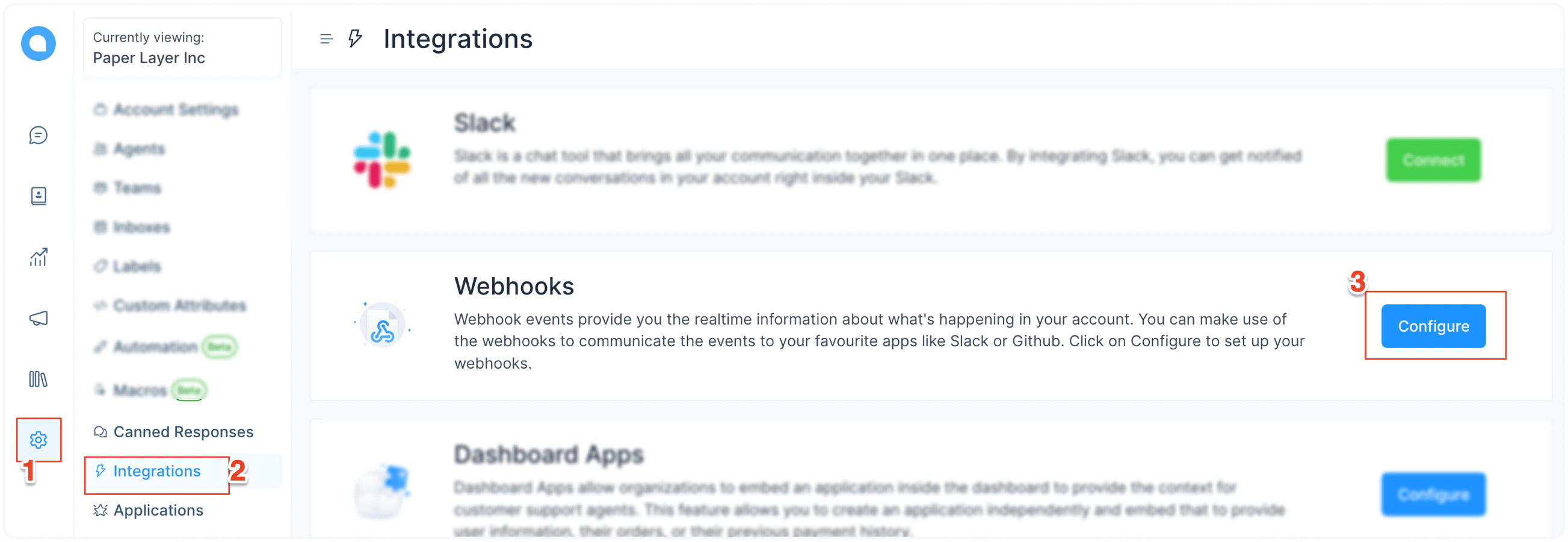
Bước 1. Vào Cài đặt → Tích hợp → Webhooks. Nhấn vào nút "Định cấu hình".
Bước 2. Nhấn vào nút "Thêm webhook mới". Một hộp thoại sẽ mở ra. Tại đây, nhập URL mà yêu cầu POST sẽ được gửi đến. Tiếp theo, bạn cần chọn các sự kiện muốn đăng ký. Tùy chọn này cho phép bạn chỉ lắng nghe các sự kiện liên quan trong SquareHub.
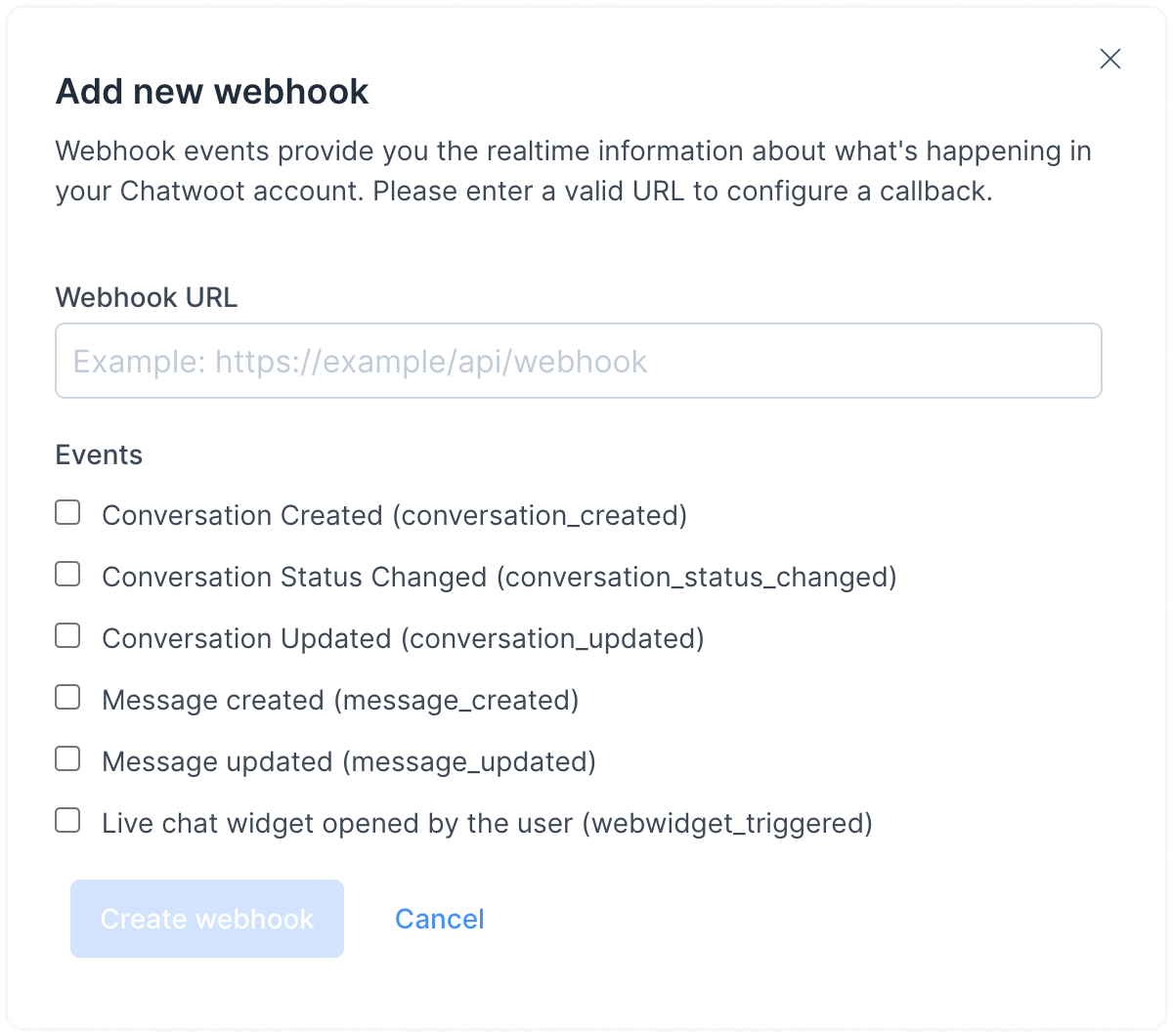
SquareHub sẽ gửi yêu cầu POST với payload sau đây đến các URL đã cấu hình cho các cập nhật khác nhau trong tài khoản của bạn.
Payload webhook mẫu
{

  "event": "message_created", // The name of the event
  "id": "1", // Message ID
  "content": "Hi", // Content of the message
  "created_at": "2020-03-03 13:05:57 UTC", // Time at which the message was sent
  "message_type": "incoming", // This will have a type incoming, outgoing or template. The user from the widget sends incoming messages, and the agent sends outgoing messages to the user.
  "content_type": "enum", // This is an enum, it can be input_select, cards, form or text. The message_type will be template if content_type is one og these. Default value is text
  "content_attributes": {} // This will an object, different values are defined below
  "source_id": "", // This would the external id if the inbox is a Twitter or Facebook integration.
  "sender": { // This would provide the details of the agent who sent this message
    "id": "1",
    "name": "Agent",
    "email": "[email protected]"
  },
  "contact": { // This would provide the details of the user who sent this message
    "id": "1",
    "name": "contact-name"
  },
  "conversation": { // This would provide the details of the conversation
    "display_id": "1", // This is the ID of the conversation which you can see in the dashboard.
    "additional_attributes": {
      "browser": {
        "device_name": "Macbook",
        "browser_name": "Chrome",
        "platform_name": "Macintosh",
        "browser_version": "80.0.3987.122",
        "platform_version": "10.15.2"
      },
      "referer": "<https://docs.squareomni.com>",
      "initiated_at": "Tue Mar 03 2020 18:37:38 GMT-0700 (Mountain Standard Time)"
    }
  },
  "account": { // This would provide the details of the account
    "id": "1",
    "name": "SquareHub",
  }
}
Các sự kiện webhook được hỗ trợ trong SquareHub
SquareHub gửi các sự kiện khác nhau đến các endpoint webhook đã cấu hình. Nếu bạn muốn cấu hình webhook, tham khảo hướng dẫn tại đây.
Mỗi sự kiện có cấu trúc payload dựa trên loại đối tượng mà chúng tác động đến. Phần dưới đây mô tả các đối tượng chính được sử dụng trong SquareHub và các thuộc tính của chúng.
Các đối tượng
Payload sự kiện có thể bao gồm bất kỳ đối tượng nào sau đây. Các loại đối tượng được SquareHub hỗ trợ được liệt kê dưới đây.
Account
{
  "id": "integer",
  "name": "string"
}
Inbox
{
"id": "integer",
"name": "string"
}
Contact
{
  "id": "integer",
  "name": "string",
  "avatar": "string",
  "type": "contact",
  "account": {
    // <...Account Object>
  }
}
User
{
  "id": "integer",
  "name": "string",
  "email": "string",
  "type": "user"
}
Conversation
{
  "additional_attributes": {
    "browser": {
      "device_name": "string",
      "browser_name": "string",
      "platform_name": "string",
      "browser_version": "string",
      "platform_version": "string"
    },
    "referer": "string",
    "initiated_at": {
      "timestamp": "iso-datetime"
    }
  },
  "can_reply": "boolean",
  "channel": "string",
  "id": "integer",
  "inbox_id": "integer",
  "contact_inbox": {
    "id": "integer",
    "contact_id": "integer",
    "inbox_id": "integer",
    "source_id": "string",
    "created_at": "datetime",
    "updated_at": "datetime",
    "hmac_verified": "boolean"
  },
  "messages": ["Array of message objects"],
  "meta": {
    "sender": {
      // Contact Object
    },
    "assignee": {
      // User Object
    }
  },
  "status": "string",
  "unread_count": "integer",
  "agent_last_seen_at": "unix-timestamp",
  "contact_last_seen_at": "unix-timestamp",
  "timestamp": "unix-timestamp",
  "account_id": "integer"
}
Message
{
  "id": "integer",
  "content": "string",
  "message_type": "integer",
  "created_at": "unix-timestamp",
  "private": "boolean",
  "source_id": "string / null",
  "content_type": "string",
  "content_attributes": "object",
  "sender": {
    "type": "string - contact/user"
    // User or Contact Object
  },
  "account": {
    // Account Object
  },
  "conversation": {
    // Conversation Object
  },
  "inbox": {
    // Inbox Object
  }
}
Payload webhook mẫu
{
  "event": "event_name"
  // Attributes related to the event
}
Các sự kiện webhook
SquareHub hỗ trợ các sự kiện webhook sau đây. Bạn có thể đăng ký chúng khi cấu hình webhook trong bảng điều khiển hoặc sử dụng API.
conversation_created
Sự kiện này sẽ được kích hoạt khi một cuộc hội thoại mới được tạo trong tài khoản. Payload cho sự kiện này như sau.
{
  "event": "conversation_created"
  // <...Conversation Attributes>
}
conversation_updated
Sự kiện này sẽ được kích hoạt khi có sự thay đổi trong bất kỳ thuộc tính nào của cuộc hội thoại.
{
  "event": "conversation_updated",
  "changed_attributes": [
    {
      "<attribute_name>": {
        "current_value": "",
        "previous_value": ""
      }
    }
  ]
  // <...Conversation Attributes>
}
conversation_status_changed
Sự kiện này sẽ được kích hoạt khi trạng thái cuộc hội thoại thay đổi.
Lưu ý: Nếu bạn đang sử dụng API agent bot thay vì webhook, sự kiện này chưa được hỗ trợ.
{
  "event": "conversation_status_changed"
  // <...Conversation Attributes>
}
message_created
Sự kiện này sẽ được kích hoạt khi một tin nhắn được tạo trong cuộc hội thoại. Payload cho sự kiện này như sau.
{
  "event": "message_created"
  // <...Message Attributes>
}
message_updated
Sự kiện này sẽ được kích hoạt khi một tin nhắn được cập nhật trong cuộc hội thoại. Payload cho sự kiện này như sau.
{
  "event": "message_updated"
  // <...Message Attributes>
}
webwidget_triggered
Sự kiện này sẽ được kích hoạt khi người dùng cuối mở widget live chat.
{
  "event": "webwidget_triggered",
  "id": "",
  "contact": {
    // <...Contact Object>
  },
  "inbox": {
    // <...Inbox Object>
  },
  "account": {
    // <...Account Object>
  },
  "current_conversation": {
    // <...Conversation Object>
  },
  "source_id": "string",
  "event_info": {
    "initiated_at": {
      "timestamp": "date-string"
    },
    "referer": "string",
    "widget_language": "string",
    "browser_language": "string",
    "browser": {
      "browser_name": "string",
      "browser_version": "string",
      "device_name": "string",
      "platform_name": "string",
      "platform_version": "string"
    }
  }
}
conversation_typing_on
Sự kiện này được kích hoạt khi nhân viên hỗ trợ bắt đầu nhập trong một cuộc hội thoại. Đây có thể là ghi chú riêng tư hoặc tin nhắn gửi đến khách hàng. Bạn có thể sử dụng cờ is_private để phân biệt hai trường hợp.
{
  "event": "conversation_typing_on",
  "conversation": { ...<Conversation Object> },
  "user": { ... <User / AgentBot / Trợ lý Square Object> },
  "is_private": true
}
conversation_typing_off
Sự kiện này được kích hoạt khi nhân viên hỗ trợ ngừng nhập hoặc khi họ rời khỏi cửa sổ hội thoại.
{
  "event": "conversation_typing_off",
  "conversation": { ...<Conversation Object> },
  "user": { ... <User / AgentBot / Trợ lý Square Object> },
  "is_private": true
}
Xác minh webhook
SquareHub ký mọi yêu cầu webhook gửi đi để máy chủ của bạn có thể xác minh rằng payload được gửi bởi SquareHub và chưa bị giả mạo. Secret được hiển thị cho bạn sau khi webhook được tạo, và bạn có thể xem lại trong biểu mẫu chỉnh sửa webhook.
Mọi yêu cầu webhook đều gửi kèm các header sau đây, có thể được dùng để tính chữ ký HMAC của payload
-
X-SquareHub-Signature: Chữ ký HMAC-SHA256 có tiền tốsha256= -
X-SquareHub-Timestamp: Unix timestamp (tính bằng giây) khi yêu cầu được ký -
X-SquareHub-Delivery: ID phân phối duy nhất cho sự kiện webhook (khi có)
Chữ ký được tính như sau:
sha256=HMAC-SHA256(webhook_secret, "{timestamp}.{raw_body}")
Trong đó:
-
webhook_secretlà secret liên kết với webhook -
timestamplà giá trị của headerX-SquareHub-Timestamp -
raw_bodylà nội dung thô của yêu cầu JSON (không được phân tích/tuần tự hóa lại)
Các bước xác minh
-
Trích xuất
X-SquareHub-SignaturevàX-SquareHub-Timestamptừ các header của yêu cầu -
Đọc nội dung thô của yêu cầu dưới dạng bytes (không phân tích và tuần tự hóa lại)
-
Tính chữ ký dự kiến:
sha256=HMAC-SHA256(secret, "{timestamp}.{raw_body}") -
So sánh chữ ký đã tính với chữ ký nhận được bằng cách so sánh constant-time
-
Tùy chọn, từ chối các yêu cầu có timestamp quá cũ để ngăn chặn tấn công phát lại (replay attacks)
Ví dụ
Ruby
def verify_signature(raw_body, timestamp, received_signature, secret)
  expected = "sha256=#{OpenSSL::HMAC.hexdigest('SHA256', secret, "#{timestamp}.#{raw_body}")}"
  ActiveSupport::SecurityUtils.secure_compare(expected, received_signature)
end
Python
import hmac
import hashlib

def verify_signature(raw_body: bytes, timestamp: str, received_signature: str, secret: str) -> bool:
    message = f"{timestamp}.".encode() + raw_body
    expected = "sha256=" + hmac.new(secret.encode(), message, hashlib.sha256).hexdigest()
    return hmac.compare_digest(expected, received_signature)
Node.js
const crypto = require("crypto");

function verifySignature(rawBody, timestamp, receivedSignature, secret) {
  const message = `${timestamp}.${rawBody}`;
  const expected =
    "sha256=" + crypto.createHmac("sha256", secret).update(message).digest("hex");
  return crypto.timingSafeEqual(
    Buffer.from(expected),
    Buffer.from(receivedSignature)
  );
}
Go
import (
	"crypto/hmac"
	"crypto/sha256"
	"encoding/hex"
	"fmt"
)

func verifySignature(rawBody []byte, timestamp, receivedSignature, secret string) bool {
	mac := hmac.New(sha256.New, []byte(secret))
	mac.Write([]byte(fmt.Sprintf("%s.%s", timestamp, rawBody)))
	expected := "sha256=" + hex.EncodeToString(mac.Sum(nil))
	return hmac.Equal([]byte(expected), []byte(receivedSignature))
}
Lưu ý quan trọng
-
Luôn sử dụng nội dung thô của yêu cầu để xác minh. Việc phân tích JSON và tuần tự hóa lại có thể thay đổi thứ tự khóa, khoảng trắng hoặc mã hóa unicode, dẫn đến chữ ký khác.
-
Luôn sử dụng so sánh constant-time (ví dụ:
hmac.compare_digest,crypto.timingSafeEqual,ActiveSupport::SecurityUtils.secure_compare) để ngăn chặn tấn công timing. -
Cân nhắc từ chối các yêu cầu có timestamp cũ hơn 5 phút để giảm thiểu tấn công phát lại.